How to Make GTA 6 Style AI Art (2026 Guide)
 GTA6Prompt Team
Turn any selfie, couple photo, or scene into GTA 6 Vice City art with our 1-click generator, ChatGPT, or Gemini. Includes tested prompts & face-lock tips.
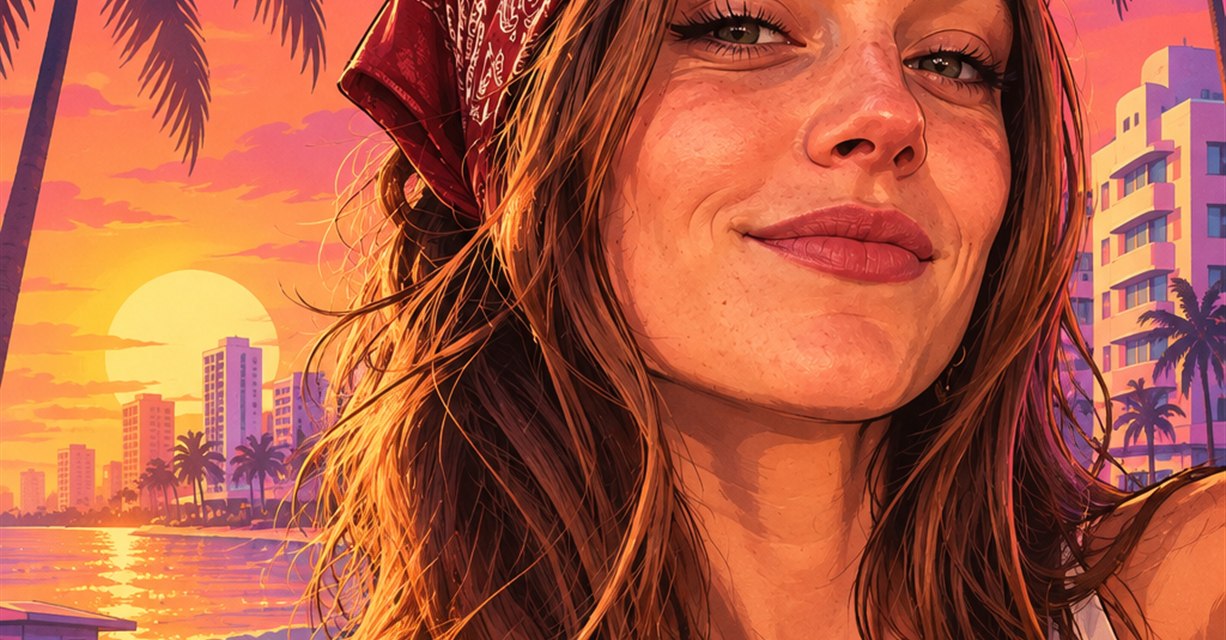
The signature GTA 6 / Vice City art style is one of the most recognizable visual aesthetics in modern gaming: crisp hand-inked outlines, bold semi-realistic cel-shaded illustration, humid Miami sunset gradients in coral, magenta, and amber, and palm-lined Leonida streets glowing beneath pastel Art Deco neon.
If you have tried typing "make my photo look like GTA 6" into a generic AI image tool, you have probably noticed two frustrating problems: either the model turns you into a generic cartoon stranger who looks nothing like your selfie, or it produces an over-smoothed 3D render that misses Rockstar’s hand-painted key art feel entirely.
In this practical 2026 guide, we break down exactly what makes GTA 6 artwork look authentic, walk through two reliable creation workflows (our face-locked 1-click generator and copy-paste prompts for ChatGPT & Google Gemini), and show you how to troubleshoot common AI mistakes like face drift, garbled logos, and flat lighting.
What Makes an Image Look Truly "GTA 6 Style"?
Before copying a single prompt, it helps to understand the five visual pillars that separate genuine Vice City promotional art from generic comic filters:
- Bold ink contours + painterly cel shading: Rockstar key art sits right between comic-book linework and high-end promotional oil painting. Shadows are grouped into clean, high-contrast shapes rather than muddy airbrush gradients.
- Miami golden-hour and neon color grading: Almost every official GTA 6 frame anchors on warm coral-orange skies, flamingo pinks, deep violet shadows, and electric cyan neon accents bouncing off skin, chrome, and wet asphalt.
- Confident, low-angle hero framing: Characters rarely stand stiffly at eye level. The camera sits slightly below chest height, giving subjects commanding posture against a sweeping skyline, convertible hood, or neon hotel strip.
- Unmistakable Leonida world props: Palm tree silhouettes, Art Deco Ocean Drive hotels, vintage 1980s convertibles, supercars, coastal causeway bridges, and Florida wetlands immediately signal Vice City before a viewer even reads a title.
- Restraint on fake text: Real promotional key art either uses clean, intentional framing with zero text or reserves dedicated negative space for a crisp emblem. Asking a raw text-to-image model to invent small typography usually creates gibberish—leaving out text or using a locked cover template solves this instantly.
Method 1: 1-Click Face-Locked GTA 6 Generator (Fastest & Most Consistent)
General chat models often reinterpret your face differently on every retry, especially when you upload two people for a duo poster or try to preserve a complex nine-panel cover layout. Using a template-locked workflow eliminates that guesswork and delivers poster-ready results in about 10 to 15 seconds.
Step-by-Step Workflow
- Choose the right studio for your goal:
- Want a solo selfie transformation? Open our GTA 6 Filter or GTA 6 Loading Screen Generator.
- Making a Bonnie & Clyde poster with your partner or best friend? Use the GTA 6 Couple Generator, which accepts either one couple photo or two separate solo portraits.
- Building a classic nine-panel game box cover? Launch the GTA 6 Cover Art Generator.
- Just looking for high-res Vice City scenery? Browse our curated Vice City Wallpaper Gallery.
- Upload a clean, well-lit reference photo: Front-facing or slight 3/4 angles with natural, even lighting give the sharpest likeness. Keep sunglasses, heavy motion blur, and extreme beauty filters out of your source photo unless you intentionally want them stylized.
- Pick the aspect ratio that matches your destination:
- 9:16 Vertical — best for Instagram Reels, TikTok, phone lock screens, and solo character posters in our GTA 6 Filter Studio.
- 16:9 Landscape — built for desktop wallpapers, YouTube thumbnails, and classic multi-panel layouts in our GTA 6 Cover Art Generator.
- Select resolution and quality: Pick 1K, 2K, or 4K for your output size. Start with Basic quality to test pose and styling, then use Pro or Ultra for more rendering detail. Generate and download your watermark-free PNG.
Free starter tip: Signing in gives you a complimentary generation plus unlimited free prompt copying across the entire gallery—so you can test our templates before picking up a one-time credit pack.
Method 2: Copy-Paste Prompts for ChatGPT & Google Gemini
If you prefer generating directly inside ChatGPT or Google Gemini, the prompt wording matters far more than most people realize. Short prompts like "turn me into GTA 6" leave too much room for the model to invent a different person or default to glossy 3D CGI.
Always upload your reference photo first, then paste one of these tested, production-ready formulas. You can also explore dedicated platform libraries on our ChatGPT GTA 6 Prompt and Gemini GTA 6 Prompt pages.
1. Solo GTA 6 Protagonist Portrait (ChatGPT)
Transform the person in this uploaded photo into an authentic GTA 6 Vice City key art illustration. Strictly preserve the exact facial structure, eyes, hairstyle, skin tone, and expression of the person in the reference image; only transform the art style, lighting, outfit, and background. Semi-realistic hand-inked digital illustration with crisp dark contours, bold cel-shaded highlights, warm Miami sunset rim lighting (coral orange, magenta, and teal), tropical palm silhouettes, and pastel Art Deco hotels along Ocean Drive at dusk. High-contrast poster finish, no text or watermarks.
2. Couple / Duo Vice City Cover Poster (ChatGPT & Gemini)
Style-transfer the two people from this uploaded photo into a GTA 6 Leonida duo cover art poster while keeping both faces, hairstyles, and natural proportions strictly faithful to the reference image. Styled in vibrant tropical streetwear leaning confidently against a classic 1980s convertible sports car under a glowing pink-and-orange Miami sunset sky. Bold comic-realistic brushwork, crisp ink outlines, dramatic shadow blocks, clean cinematic poster framing, no logos or text.
3. Classic GTA 6 Loading Screen Character (Avatar & Wallpaper)
Reimagine the subject from this photo as an illustrated GTA 6 loading screen character portrait. Maintain exact facial likeness from the uploaded photo. Dramatic golden-hour sunset rim lighting, sharp Rockstar-inspired cel-shaded digital painting, softly blurred coastal boulevard with palm trees and neon reflections in the background, confident stance, vibrant tropical color grading, clean composition without any text.
4. Vice City Supercar & Neon Boulevard (Pure Text-to-Image)
GTA 6 loading screen style digital illustration of a glossy bright yellow supercar with scissor doors speeding down a rain-slicked Miami neon boulevard at twilight, palm trees and pastel Art Deco hotels reflecting across wet asphalt, bold hand-inked contours, vibrant magenta and cyan highlights, cinematic low-angle camera perspective, masterpiece game key art aesthetic, no logos or UI text.
The 5-Part Formula to Customize Any GTA 6 Prompt
Once you have a working base prompt, you can remix endless variations—from retro 1980s Miami sunset posters and yellow Pegassi supercars to hilarious Florida alligator memes—by swapping just five building blocks:
- Identity Anchor: "Preserve the exact facial structure, hairstyle, and likeness of the person in the uploaded photo" (mandatory for selfies; omit for pure scenery).
- Wardrobe & Props: Swap tactical streetwear for vintage 1980s Hawaiian shirt, aviator sunglasses, leather racing jacket, or tailored Miami blazer.
- Time of Day & Palette: Choose golden-hour coral sunset, electric pink-and-cyan midnight neon, or moody rain-slicked dusk.
- Leonida Backdrop: Pick Ocean Drive Art Deco strip, palm-lined coastal causeway bridge, luxury marina with yachts, or misty Leonida cypress wetlands.
- Style & Guardrails: Always close with semi-realistic hand-inked digital illustration, bold cel-shaded shadows, no watermarks or garbled text.
Troubleshooting the 4 Most Common AI Mistakes
1. "The result looks like a generic cartoon instead of GTA 6."
Drop words like "cartoon", "anime", or "comic book" on their own. Replace them with "semi-realistic promotional digital painting, crisp ink outlines, bold painterly cel-shading, dramatic rim lighting." That phrase immediately pushes both GPT Image and Gemini into Rockstar’s signature mature illustration weight.
2. "It changed my face or aged me by 10 years."
Two fixes work together: first, start with a sharp, uncropped photo where your face occupies at least 20–30% of the frame in even light; second, put the face-preservation sentence at the very beginning of your prompt rather than burying it at the end.
3. "The AI generated misspelled GTA logos."
Public image models frequently distort small trademarked lettering. Add "no text, no logos, no watermarks" to raw prompts, or use a template-locked cover generator like our GTA 6 Cover Art Generator where layout geometry is anchored from the reference image.
4. "My couple photo merged our faces or swapped outfits weirdly."
When generating duos, avoid crowded group photos. Upload either a clean two-person upper-body shot with both faces clearly separated, or use the Left / Duo and Right slots in our GTA 6 Couple Generator to upload two separate portraits.
Ready to Create Your Own Vice City Key Art?
You do not need Photoshop skills or hours of prompt trial-and-error to get authentic Rockstar-grade results:
- Try the GTA 6 Loading Screen Generator for an instant solo character graphic.
- Turn a partner photo into a duo poster in the GTA 6 Couple Generator.
- Explore high-resolution scenes in our Vice City Wallpaper Gallery, or test our GTA 6 Filter and GTA 6 Cover Art Generator right now.